24/7 Locksmith Service
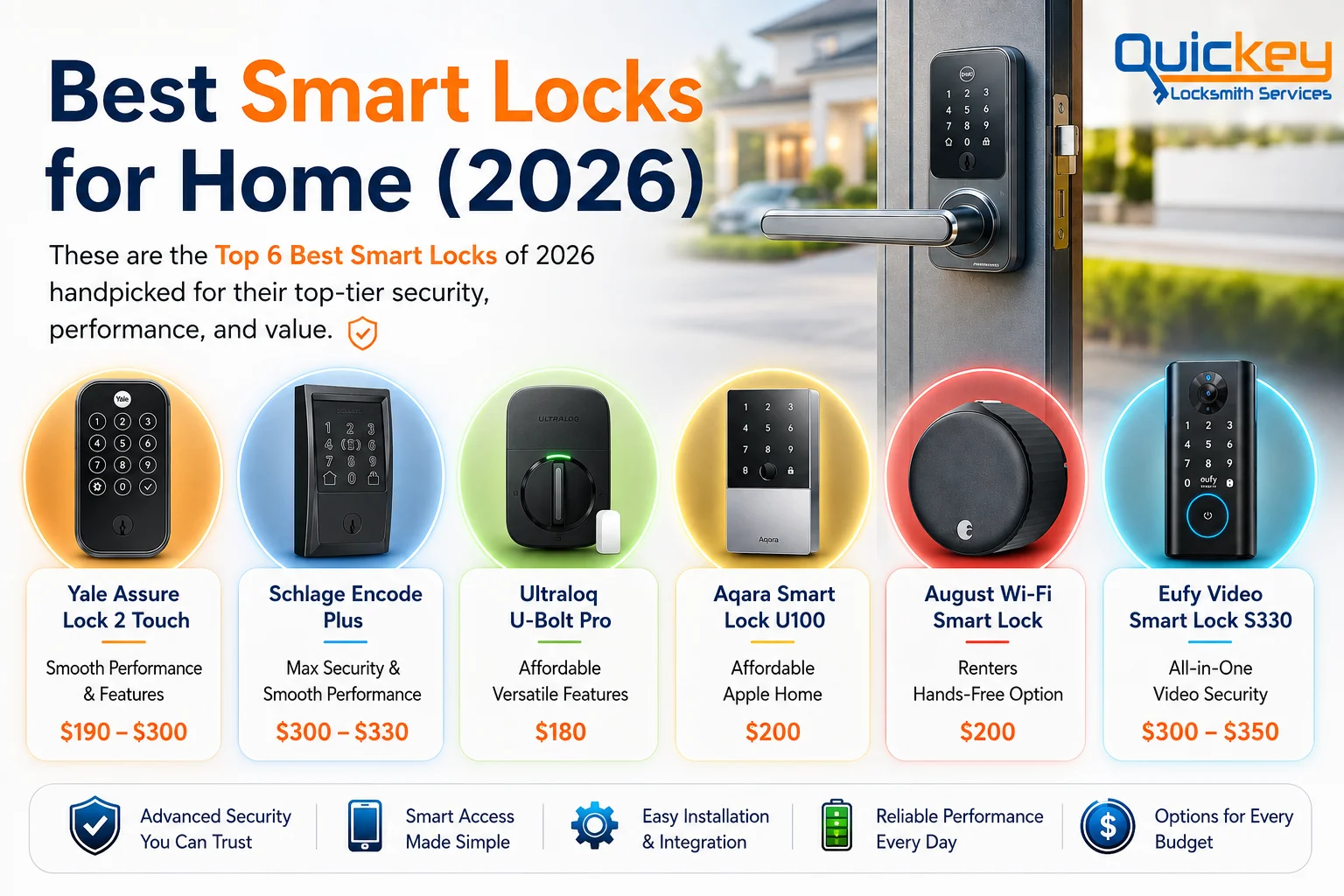
An infographic titled "Best Smart Locks for Home (2026)" featuring the Quickey Locksmith Services logo in the top-right corner. The design uses a clean white background with dark blue and orange branding colors. On the left side, a large bold heading introduces the topic, followed by a short description explaining that the featured smart locks were handpicked for their security, performance, and overall value. A small orange shield icon appears beneath the introduction to reinforce the security theme. The right side of the infographic displays a realistic modern front door fitted with a black touchscreen smart lock featuring a silver lever handle and deadbolt. The softly blurred background shows a contemporary home exterior with a driveway and landscaping, creating the appearance of a secure residential entrance. Across the center of the infographic are six realistic smart lock product images, each displayed inside a glowing colored circular frame with a matching information card below. Every card includes the product name, its primary strength, and its price. From left to right, the products are Yale Assure Lock 2 Touch, highlighted for Smooth Performance & Features with a price of $190–$300; Schlage Encode Plus, highlighted for Max Security & Smooth Performance priced at $300–$330; Ultraloq U-Bolt Pro, described as Affordable Versatile Features priced at $180; Aqara Smart Lock U100, highlighted for Affordable Apple Home priced at $200; August Wi-Fi Smart Lock, recommended for Renters Hands-Free Option priced at $200; and Eufy Video Smart Lock S330, promoted as All-in-One Video Security with a price range of $300–$350. Along the bottom of the infographic is a horizontal feature bar with illustrated blue icons representing the key benefits of smart locks. These include Advanced Security You Can Trust, Smart Access Made Simple, Easy Installation & Integration, Reliable Performance Every Day, and Options for Every Budget, summarizing the main factors homeowners should consider when choosing a smart lock for their home.

Best Smart Locks for Home (2026)

Finding the best smart lock for your home isn’t always easy. With so many options available, it’s hard to know which one offers the right balance of security, smart features, reliability, and value for money.

To make your decision easier, we compared today’s top smart locks and narrowed them down to the 6 best options for homeowners. Each recommendation includes its key features, pricing, pros, cons, and the type of home it’s best suited for, so you can quickly find the right smart lock for your needs.

Short on time? Start with our quick comparison table below, then explore our detailed reviews to see why each smart lock made the list.

Best Smart Locks for Home: Quick Comparison

Smart Lock

Schlage Encode Plus

Yale Assure Lock 2 Touch

Ultraloq U-Bolt Pro

Aqara Smart Lock U100

August Wi-Fi Smart Lock

Eufy Video Smart Lock S330

Best for

Max Security & Smooth Performance

 Smooth Performance & Features

Affordable Versatile Features

Affordable Apple Home

Renters Hands-Free Option

All-in-One Video Security

Security

 Grade 1 (Highest)

Grade 2 (Standard)

Grade 1 (Highest)

Grade 3 (Basic)

Depends on Existing Deadbolt

Grade 3 (Basic)

Unlock Methods

Key, PIN, App, Apple Home Key, Voice, GPS Auto Unlock

Fingerprint, Key, PIN, App, Voice, GPS Auto Unlock

Fingerprint, PIN, App, Key, Voice, GPS Auto Unlock

Fingerprint, PIN, Key, NFC Card, App, Apple Home Key, Voice 

App, Key, GPS Auto Unlock, Voice

Fingerprint, PIN, Key, App, Voice

Connectivity

Wi-Fi, Bluetooth, Apple Home, Alexa, Google Home

Wi-Fi, Bluetooth, Apple Home, Alexa, Google Home, Samsung SmartThings

Wi-Fi, Bluetooth, Apple Home, Alexa, Google Home, Samsung SmartThings

Zigbee, Bluetooth, Apple Home, Alexa, Google Home, Aqara Home

Wi-Fi, Bluetooth, Apple Home, Alexa, Google Home, Samsung SmartThings

Wi-Fi, Bluetooth, Apple Home, Alexa, Google Home, Samsung SmartThings

price

$300 – $330

$190 – $300

$180

$190

$200

$300 – $350

6 Best Smart Locks for Home: Detailed Reviews

Note: The smart locks below are not ranked from best to worst. Each one excels in different areas, so the best choice depends on your budget, preferred features, smart home ecosystem, and security needs.
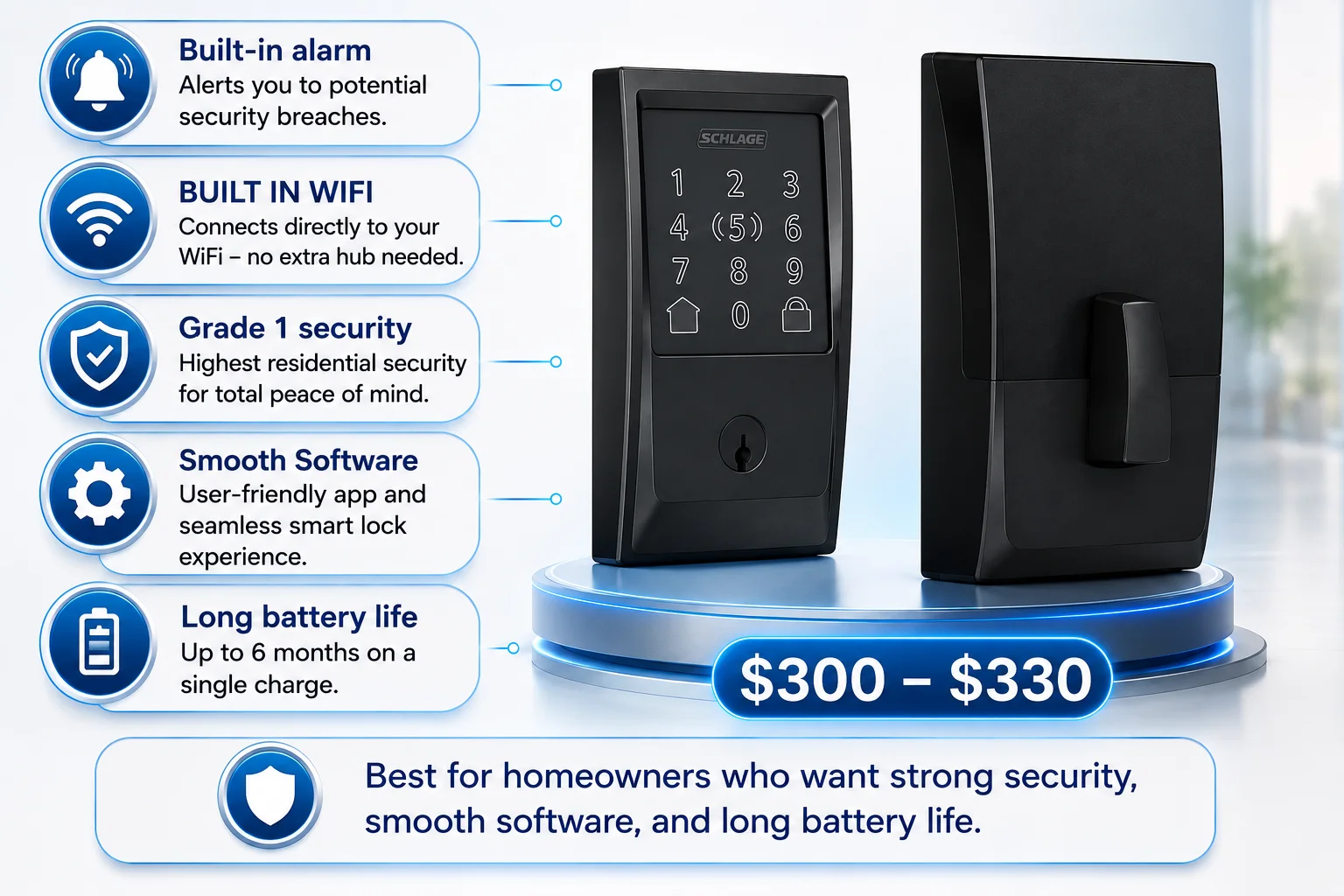
An infographic highlighting the Schlage Encode Plus smart lock with a clean white background and blue accent colors. The right side of the image features realistic front and rear views of the black Schlage Encode Plus smart lock displayed on a modern circular podium with blue LED lighting, emphasizing the product as the main focus. A large blue price tag below the lock displays the estimated price range of $300–$330. The left side of the infographic contains five rounded feature cards connected to the smart lock with thin blue guide lines. Each card includes a blue circular icon and a short explanation of the lock's key features. The first card highlights a built-in alarm that alerts homeowners to potential security breaches. The second explains that the lock includes built-in Wi-Fi, allowing it to connect directly to a home Wi-Fi network without requiring an additional hub. The third feature emphasizes ANSI/BHMA Grade 1 security, the highest residential security rating for enhanced protection. The fourth highlights smooth software, describing a user-friendly app and seamless smart lock experience. The fifth feature promotes long battery life, stating that the lock can operate for up to six months on a single set of batteries. At the bottom of the infographic, a wide recommendation banner with a blue shield icon states that the Schlage Encode Plus is best for homeowners who want strong security, smooth software, and long battery life, summarizing the lock's ideal use case. The overall design uses a clean, modern layout with blue and white colors to present the smart lock's key features, pricing, and recommended audience in an easy-to-understand format.

The Schlage Encode Plus brings smart features to a traditional lock design with keypad access, app control, voice control, and Apple Home Key support. It offers Grade 1 security, smooth software, and reliable performance. However, it lacks fingerprint access and auto-unlock, and comes at a higher price.

  • Grade 1 security rating
  • Built-in Wi-Fi with no additional hub required
  • Built-in alarm for forced-entry attempts
  • Smooth Software
  • Long battery life
  • No fingerprint scanner
  • No automatic unlocking
  • High Price

Best for homeowners who want strong security, smooth software, and long battery life.
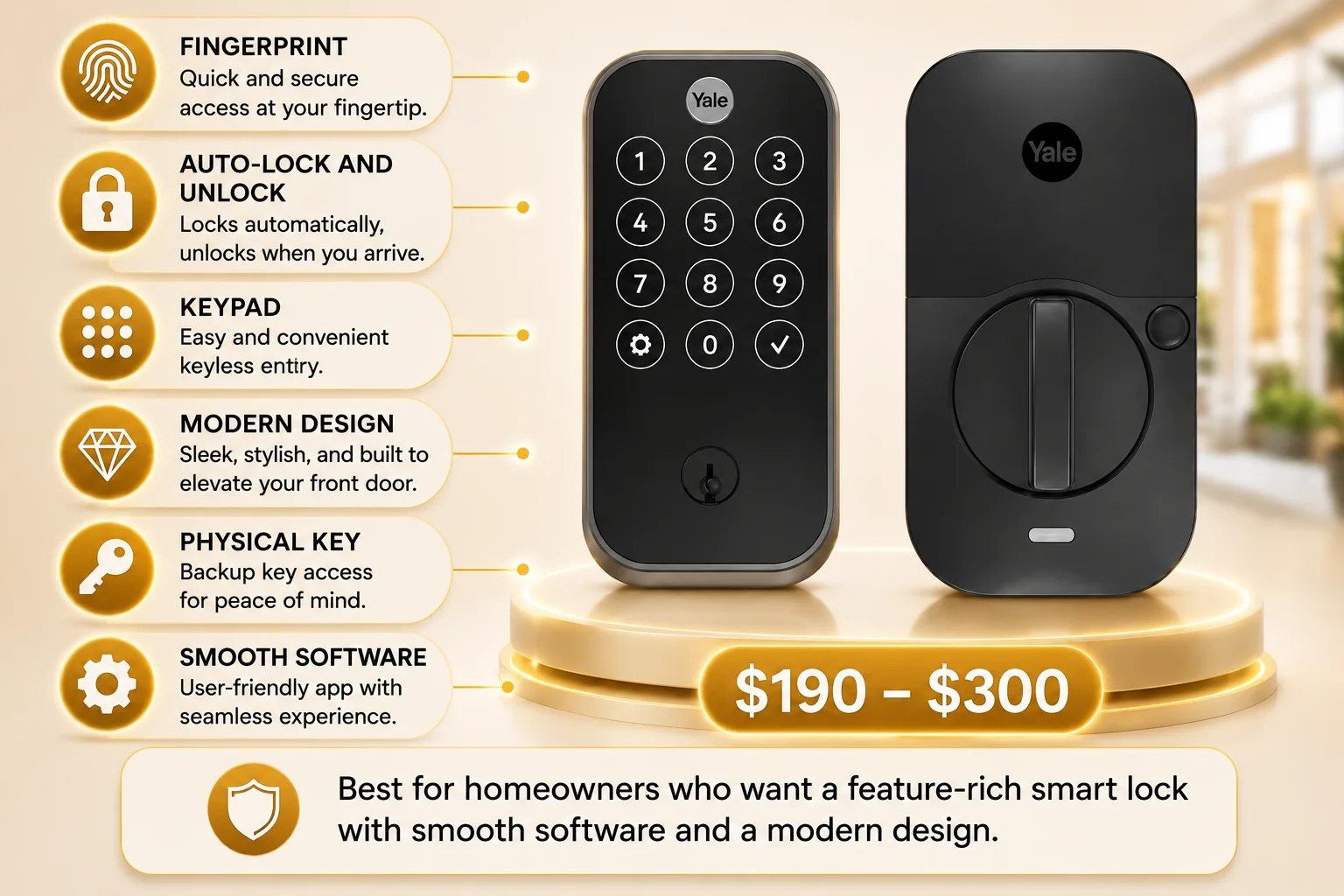
An infographic highlighting the Yale Assure Lock 2 Touch smart lock with a clean white background accented by warm gold and black colors. The right side of the image features realistic front and rear views of the matte black Yale Assure Lock 2 Touch displayed on a modern circular podium illuminated with soft golden LED lighting, making the smart lock the primary focus of the design. A large gold price tag positioned below the lock displays the estimated price range of $190–$300. The left side of the infographic contains six rounded feature cards connected to the smart lock with thin gold guide lines. Each card includes a gold circular icon alongside a brief description of one of the lock's key features. The first card highlights Fingerprint access, describing quick and secure biometric entry at your fingertip. The second explains Auto-Lock and Unlock, noting that the lock automatically secures the door and unlocks when you arrive. The third highlights the built-in Keypad, offering convenient keyless entry. The fourth promotes the lock's Modern Design, describing its sleek appearance that enhances the look of a front door. The fifth feature emphasizes the inclusion of a Physical Key, providing backup access for added peace of mind. The sixth highlights Smooth Software, describing a user-friendly app that delivers a seamless smart lock experience. The front view of the smart lock displays a touchscreen keypad with illuminated numeric buttons, the Yale logo at the top, and a traditional key cylinder near the bottom, while the rear view shows the interior thumb-turn mechanism used for manually locking and unlocking the door from inside the home. Both views are presented on a premium gold display platform with soft lighting effects that reinforce the product's modern appearance. At the bottom of the infographic, a wide recommendation banner featuring a gold shield icon states that the Yale Assure Lock 2 Touch is best for homeowners who want a feature-rich smart lock with smooth software and a modern design, summarizing the product's ideal use case. The overall design uses a clean layout with white, gold, and black colors, realistic product renders, and organized feature cards to clearly present the smart lock's features, pricing, and recommended audience in an easy-to-understand format.

The Yale Assure Lock 2 Touch stands out for its modern design, fingerprint access, auto-unlock feature, and smooth software experience. It offers a feature-rich smart lock experience for homeowners who want more ways to unlock and manage their front door. However, it has a Grade 2 security rating, around 3–4 months of battery life with Wi-Fi, and a higher price due to its premium features.

  • Multiple access options
  • Auto-Lock and Unlock
  • Premium, modern design
  • Wide smart-home compatibility
  • Smooth Software
  • High Price
  • ANSI/BHMA Grade 2 security rating
  • 3–4 months battery life with Wi-Fi

Best for homeowners who want a feature-rich smart lock with smooth software and a modern design.
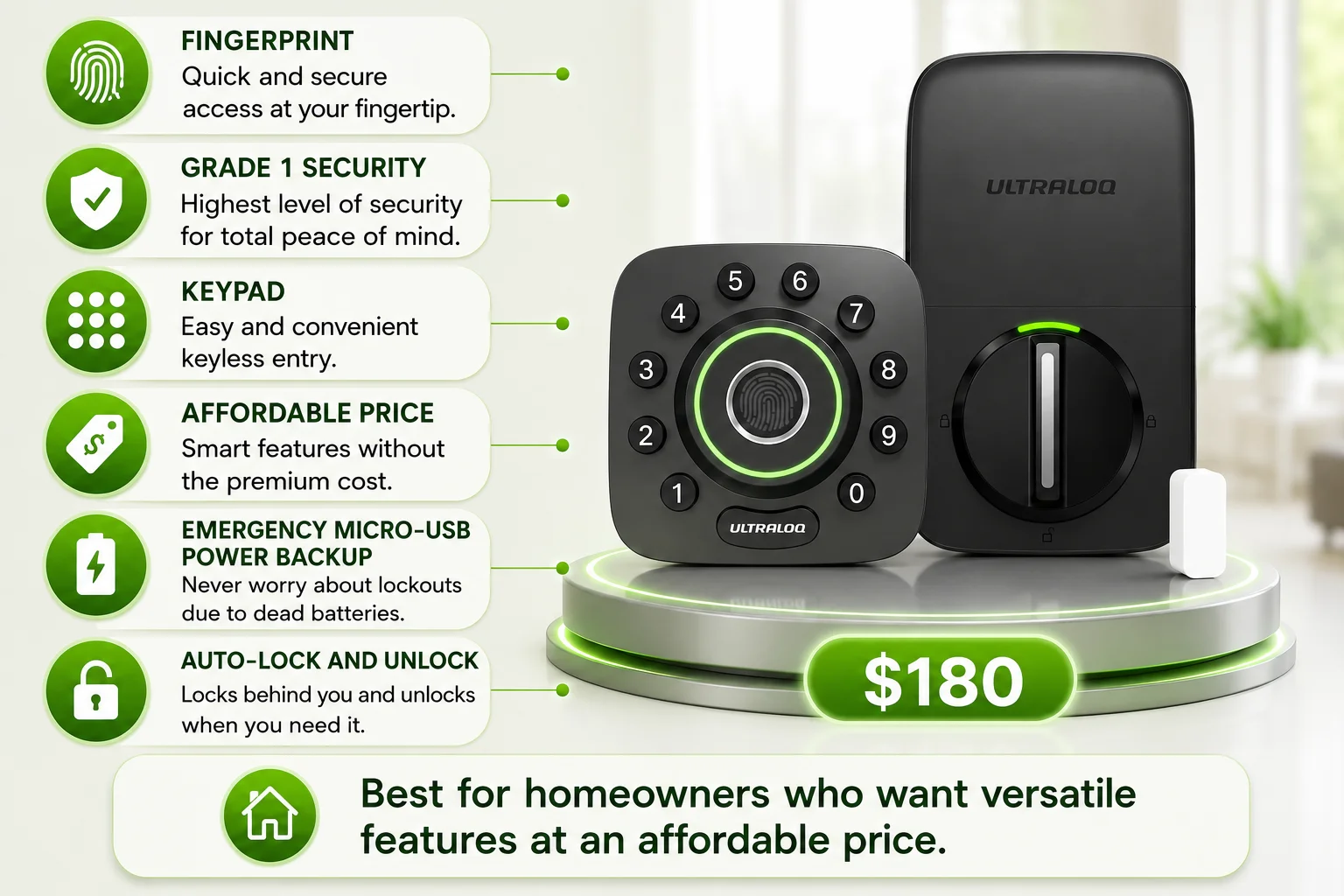
An infographic highlighting the Ultraloq U-Bolt Pro smart lock with a clean white background accented by vibrant green and black colors. The right side of the image features realistic front and rear views of the matte black Ultraloq U-Bolt Pro displayed on a modern circular podium illuminated with soft green LED lighting, making the smart lock the primary focus of the design. A small white wireless door sensor is positioned beside the lock, while a large green price tag below the podium displays the price of $180. The left side of the infographic contains six rounded feature cards connected to the smart lock with thin green guide lines. Each card includes a green circular icon alongside a brief description of one of the lock's key features. The first card highlights Fingerprint access, describing quick and secure biometric entry at your fingertip. The second emphasizes Grade 1 Security, stating that the lock provides the highest level of residential security for complete peace of mind. The third highlights the built-in Keypad, offering easy and convenient keyless entry. The fourth promotes its Affordable Price, noting that it delivers smart features without the premium cost. The fifth highlights Emergency Micro-USB Power Backup, explaining that temporary power can be supplied if the batteries are depleted, helping prevent lockouts. The sixth feature describes Auto-Lock and Unlock, explaining that the lock automatically secures the door behind you and unlocks when needed for added convenience. The front view of the smart lock features a square-shaped keypad with rounded corners, circular number buttons arranged around a centrally located fingerprint sensor surrounded by a glowing green LED ring. The Ultraloq logo appears near the bottom of the exterior unit. The rear view shows the interior smart lock module with a large circular thumb-turn mechanism, a slim vertical handle in the center, and a green LED status light above it, along with the Ultraloq branding near the top. At the bottom of the infographic, a wide recommendation banner featuring a green circular icon with a white house symbol states that the Ultraloq U-Bolt Pro is best for homeowners who want versatile features at an affordable price, summarizing the product's ideal use case. The overall design uses a clean layout with white, green, and black colors, realistic product renders, glowing lighting effects, and organized feature cards to clearly present the smart lock's features, pricing, and recommended audience in an easy-to-understand format.

The U-Bolt Pro WiFi offers an impressive range of features at an affordable price, including fingerprint access, multiple unlocking methods, and built-in Wi-Fi. It is a strong choice for homeowners who want versatility without paying a premium price. However, its software experience is less polished, it lacks Apple Home support, and its bulky design may not appeal to some homeowners.

  • Grade 1 security
  • Affordable price
  • Emergency Micro-USB power backup
  • Auto-Lock and Unlock
  • Bulky design
  • Less Refined Software
  • No Apple Home support

Best for homeowners who want versatile features at an affordable price.
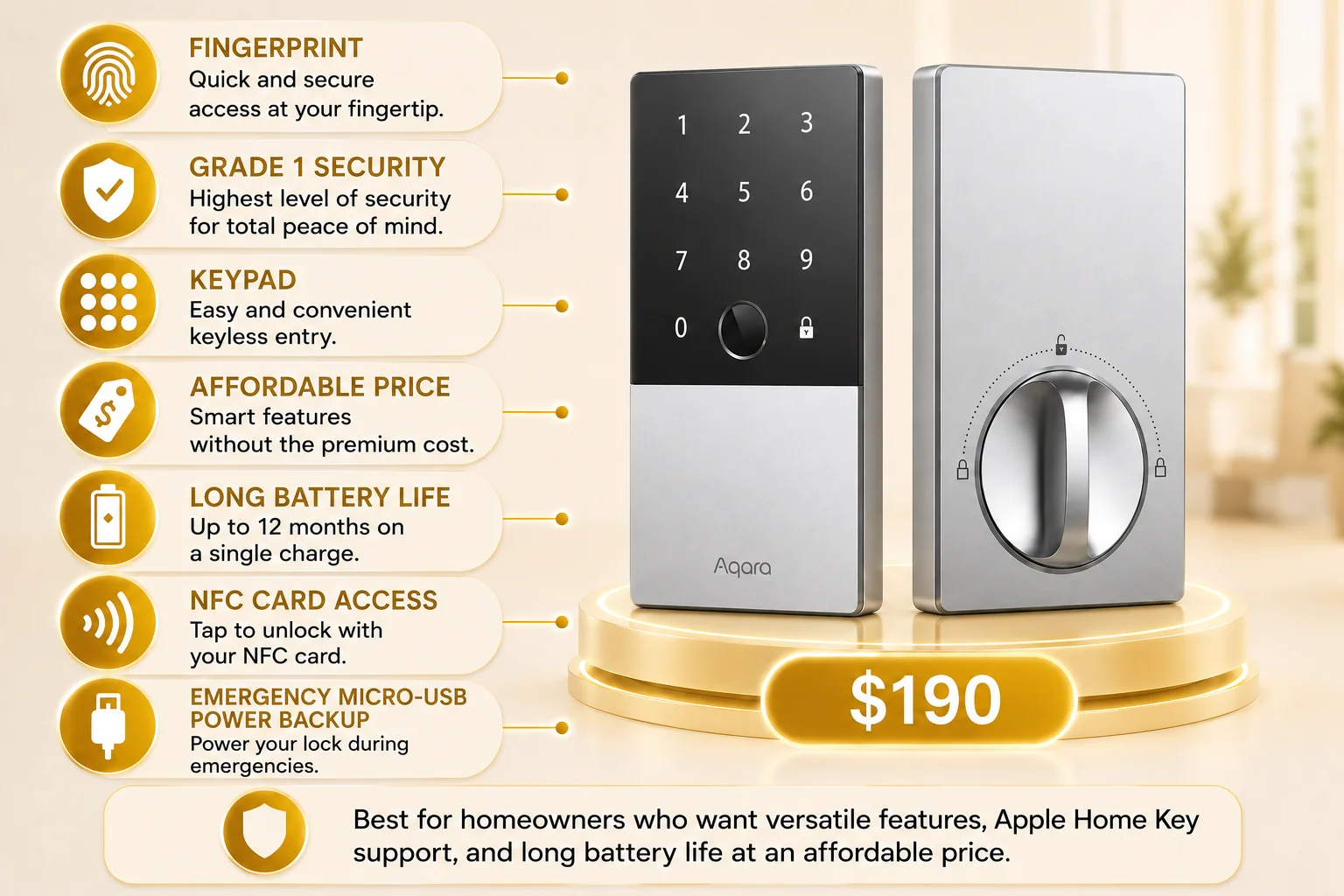
An infographic highlighting the Aqara Smart Lock U100 with a clean white background accented by warm gold and black colors. The right side of the image features realistic front and rear views of the silver and black Aqara Smart Lock U100 displayed on a modern circular podium illuminated with soft golden LED lighting, making the smart lock the primary focus of the design. A large gold price tag positioned below the podium displays the price of $190. The left side of the infographic contains seven rounded feature cards connected to the smart lock with thin gold guide lines. Each card includes a gold circular icon alongside a brief description of one of the lock's key features. The first card highlights Fingerprint access, describing quick and secure biometric entry at your fingertip. The second emphasizes Grade 1 Security, stating that the lock provides the highest level of residential security for added peace of mind. The third highlights the built-in Keypad, offering easy and convenient keyless entry. The fourth promotes its Affordable Price, explaining that it delivers smart features without the premium cost. The fifth highlights Long Battery Life, stating that the lock can operate for up to 12 months on a single charge. The sixth feature describes NFC Card Access, allowing users to unlock the door by tapping an NFC card. The seventh highlights Emergency Micro-USB Power Backup, explaining that the lock can be temporarily powered during emergencies if the battery runs out. The front view of the smart lock features a sleek rectangular design with a glossy black upper panel displaying illuminated touchscreen number keys, a circular fingerprint sensor positioned below the keypad, and a brushed silver lower section with the Aqara logo. The rear view shows the interior lock unit finished in silver with a large circular thumb-turn mechanism used for manually locking and unlocking the door from inside the home. At the bottom of the infographic, a wide recommendation banner featuring a gold shield icon states that the Aqara Smart Lock U100 is best for homeowners who want versatile features, Apple Home Key support, and long battery life at an affordable price, summarizing the product's ideal use case. The overall design uses a clean layout with white, gold, black, and silver colors, realistic product renders, glowing lighting effects, and organized feature cards to clearly present the smart lock's features, pricing, and recommended audience in an easy-to-understand format.

The Aqara Smart Lock U100 offers versatile unlocking options, Apple Home Key support, and long battery life at an affordable price. However, it lacks built-in Wi-Fi, requires an additional hub for some smart features, and has a Grade 3 security rating.

  • Emergency Micro-USB power backup
  • NFC card access
  • Up to 8 months of battery life
  • Affordable price
  •  
  • No built-in Wi-Fi
  • Grade 3 security
  • Requires an additional hub for remote access and some smart-home features

Best for homeowners who want versatile features, Apple Home Key support, and long battery life at an affordable price.
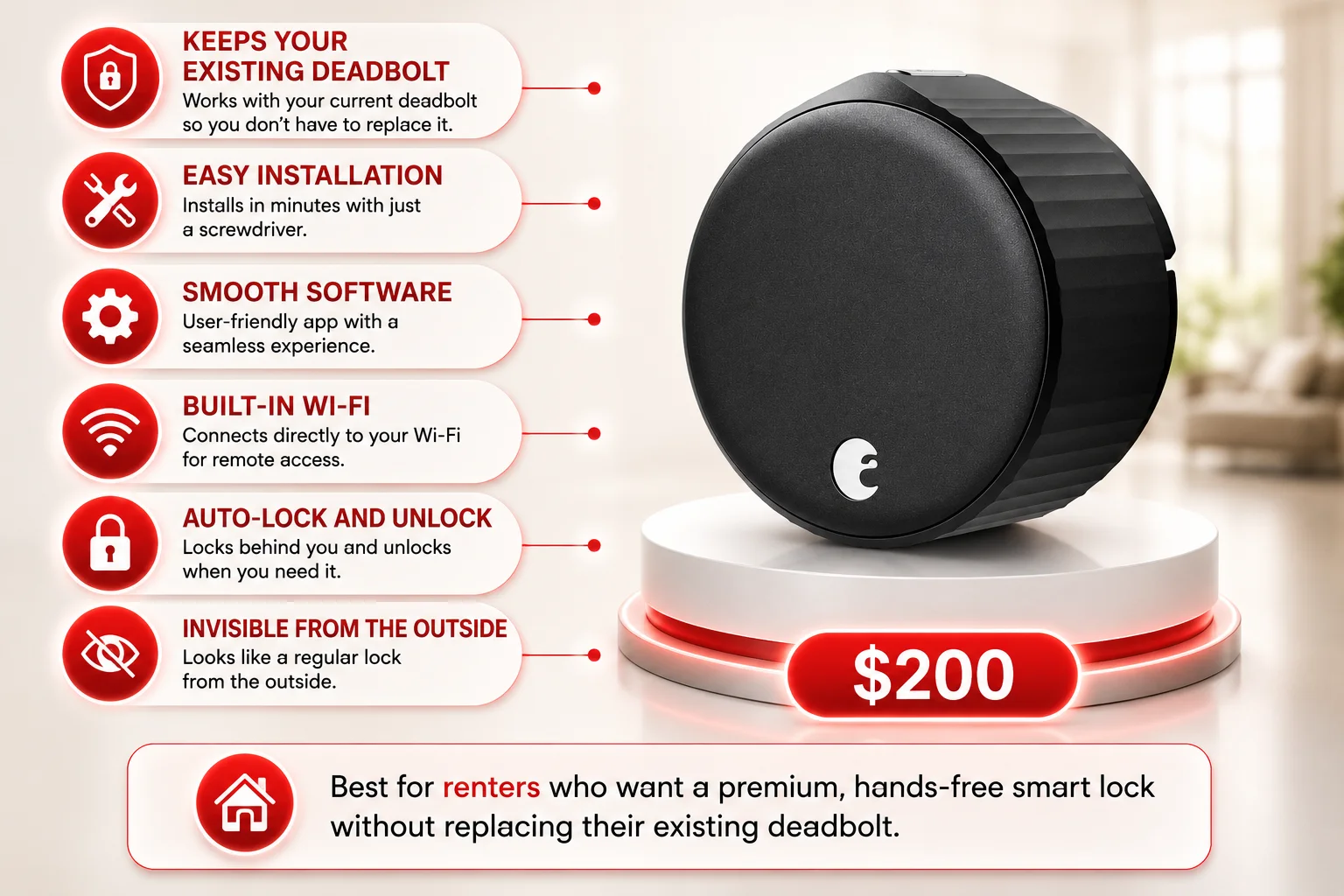
An infographic highlighting the August Wi-Fi Smart Lock with a clean white background accented by bold red and black colors. The right side of the image features a realistic render of the matte black August Wi-Fi Smart Lock displayed on a modern circular podium illuminated with soft red LED lighting, making the smart lock the primary focus of the design. Unlike traditional smart locks, only the interior circular lock mechanism is shown, emphasizing that it works with an existing deadbolt rather than replacing the entire lock. A large red price tag positioned below the podium displays the price of $200. The left side of the infographic contains six rounded feature cards connected to the smart lock with thin red guide lines. Each card includes a red circular icon alongside a brief description of one of the lock's key features. The first card highlights Keeps Your Existing Deadbolt, explaining that the smart lock works with the current deadbolt so there is no need to replace it. The second feature emphasizes Easy Installation, stating that the lock can be installed in minutes using only a screwdriver. The third highlights Smooth Software, describing a user-friendly app that provides a seamless smart lock experience. The fourth promotes Built-in Wi-Fi, explaining that the lock connects directly to a home Wi-Fi network for remote access without additional hardware. The fifth feature highlights Auto-Lock and Unlock, explaining that the lock automatically secures the door behind you and unlocks when needed for hands-free convenience. The sixth feature emphasizes that the lock is Invisible from the Outside, explaining that it looks like a standard deadbolt from the exterior of the home. The product render shows a compact, circular matte black smart lock with textured ridges around its outer edge and a small August logo near the bottom, reflecting its minimalist design intended for installation on the inside of a door. The softly blurred background suggests a modern home interior, keeping the focus on the featured product. At the bottom of the infographic, a wide recommendation banner featuring a red circular icon with a white house symbol states that the August Wi-Fi Smart Lock is best for renters who want a premium, hands-free smart lock without replacing their existing deadbolt, summarizing the product's ideal use case. The overall design uses a clean layout with white, red, and black colors, realistic product renders, glowing lighting effects, and organized feature cards to clearly present the smart lock's features, pricing, and recommended audience in an easy-to-understand format.

The August Wi-Fi Smart Lock is a premium, hands-free option that works with your existing deadbolt and offers easy installation. However, it lacks built-in fingerprint or keypad access and has relatively short battery life.

  • Keeps your existing deadbolt
  • Easy installation
  • Smooth Software
  • Built-in Wi-Fi
  • Short battery life
  • No built-in keypad or fingerprint scanner
  • High Price

Best for renters who want a premium, hands-free smart lock without replacing their existing deadbolt.
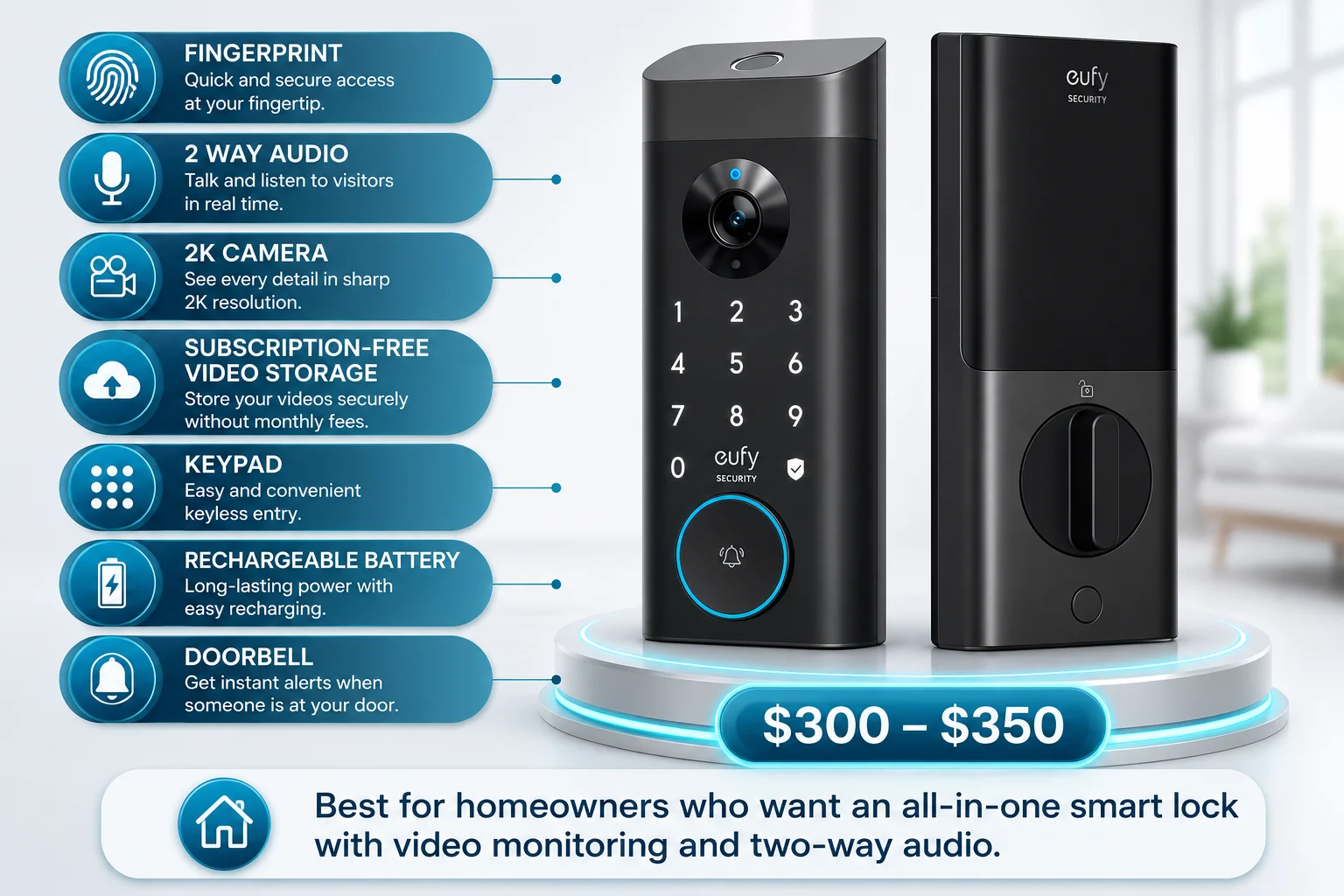
An infographic highlighting the Eufy Video Smart Lock S330 with a clean white background accented by bright blue and black colors. The right side of the image features realistic front and rear views of the matte black Eufy Video Smart Lock S330 displayed on a modern circular podium illuminated with soft blue LED lighting, making the smart lock the primary focus of the design. A large blue price tag positioned below the podium displays the estimated price range of $300–$350. The left side of the infographic contains seven rounded feature cards connected to the smart lock with thin blue guide lines. Each card includes a blue circular icon alongside a brief description of one of the lock's key features. The first card highlights Fingerprint access, describing quick and secure biometric entry at your fingertip. The second promotes 2-Way Audio, allowing homeowners to talk and listen to visitors in real time. The third highlights the built-in 2K Camera, explaining that it captures sharp, high-resolution video for enhanced monitoring. The fourth feature emphasizes Subscription-Free Video Storage, stating that videos can be stored securely without monthly subscription fees. The fifth highlights the built-in Keypad, providing easy and convenient keyless entry. The sixth promotes the Rechargeable Battery, describing long-lasting power with simple recharging. The seventh feature highlights the integrated Doorbell, providing instant alerts whenever someone arrives at the front door. The front view of the smart lock features an integrated camera positioned above the illuminated touchscreen keypad, with the Eufy Security branding below the camera and a large circular doorbell button surrounded by a glowing blue LED ring near the bottom. The rear view shows the interior smart lock module with a large thumb-turn mechanism used for manually locking and unlocking the door from inside the home. At the bottom of the infographic, a wide recommendation banner featuring a blue circular icon with a white house symbol states that the Eufy Video Smart Lock S330 is best for homeowners who want an all-in-one smart lock with video monitoring and two-way audio, summarizing the product's ideal use case. The overall design uses a clean layout with white, blue, and black colors, realistic product renders, glowing lighting effects, and organized feature cards to clearly present the smart lock's features, pricing, and recommended audience in an easy-to-understand format.

The Eufy Video Smart Lock S330 is an all-in-one front door security solution that combines a smart lock, 2K video doorbell, and two-way audio in a single device. It supports fingerprint, keypad, app, voice, and physical key access while letting you see and speak to visitors from anywhere. However, it doesn’t support Apple Home, lacks auto-unlock, has a bulkier design than most smart locks, and its software isn’t as refined as some premium competitors.

  • All-in-one design
  • Built-in 2K camera with two-way audio
  • Rechargeable Lithium Battery
  • Subscription-free video storage
  • Smart AI detection
  • No Apple Home support
  • Bulky design
  • No auto-unlock

Best for homeowners who want an all-in-one smart lock with video monitoring and two-way audio.

Need Help Choosing or Installing a Smart Lock?

Not sure which smart lock is right for your home? Quickey Locksmith can help you choose the best option based on your security needs, budget, and smart home setup. Our licensed team can also provide expert smart lock installation to ensure everything works properly.

licensed locksmiths

Professional Installation

Honest Recommendations

Upfront Pricing

How to Choose the Best Smart Lock for Your Home

Choosing the right smart lock depends on your security needs, preferred unlocking methods, smart home setup, and budget. Before buying a smart lock, consider these key factors:

Security & Software Quality

Security and software performance should be among the most important factors when choosing a smart lock. Look for locks with higher security ratings, such as ANSI/BHMA Grade 1, and smooth software to ensure smart features work reliably without issues.

Unlocking Methods

They offer different ways to access your home, including fingerprint, PIN codes, smartphone apps, voice control, GPS-based auto-unlock, physical keys, and Apple Home Key. Choose a lock based on the access methods that are most convenient for you.

Smart Home Compatibility

Make sure the smart lock works with your existing smart home ecosystem. Check compatibility with platforms like Apple Home, Google Home, Amazon Alexa, and Samsung SmartThings before making a purchase.

Battery Life and Backup Options

Battery life varies between smart locks. Consider how often batteries need replacement and whether the lock provides backup options, such as a physical key, emergency power port, or rechargeable battery.

Installation Type

Smart locks come in two main types:

  • Full replacement locks: Replace your existing deadbolt and offer more built-in features.
  • Retrofit locks: Attach to your existing lock, making them easier to install and ideal for renters.
Features vs Budget

More expensive smart locks often provide premium features like smoother software, fingerprint access, advanced automation, and better smart home integration. Choose a lock that offers the features you actually need instead of paying extra for unnecessary features.

Frequently Asked Questions

There is no single best brand for everyone. The best choice depends on your needs, such as security, smart features, Apple Home compatibility, budget, or video features.


Police generally recommend high-security deadbolts with strong construction and reliable security ratings, such as ANSI/BHMA Grade 1 locks. For smart locks, choose models that combine strong physical security with reliable software and proper installation.

GPS auto-unlock uses your phone’s location to automatically unlock the door when you arrive home. It works through geofencing, so the lock detects when you are nearby and unlocks without opening the app manually.

Apple Home is the ecosystem that lets you control compatible smart home devices through the app, voice commands, and automations. While Apple Home Key is a separate feature that turns your iPhone or Apple Watch into a digital key, allowing you to unlock supported smart locks by simply tapping your device near the lock.

In short, Apple Home lets you control your lock, while Apple Home Key lets you unlock it like a physical key.

Related Services
Related Blogs