24/7 Locksmith Service

What Is a Smart Lock and How Do Smart Locks Work?

Smart locks are becoming a popular choice for homes because they offer convenient keyless access and greater control over your door’s security. If you’re new to smart locks, here are the two most important things to know before deciding if one is right for you.


What Is a Smart Lock? An electronic door lock that lets you lock and unlock your door using a smartphone, keypad, fingerprint, or other secure methods instead of relying only on a traditional key.


How Do Smart Locks Work? Smart locks verify your identity through secure authentication, such as a mobile app, PIN code, fingerprint, Bluetooth, or Wi-Fi, before locking or unlocking your door.


If you want to understand smart locks in more detail, you’re in the right place. This guide explains everything you need to know, including how they work, their common features, the different types available, and whether they’re worth considering for your home.

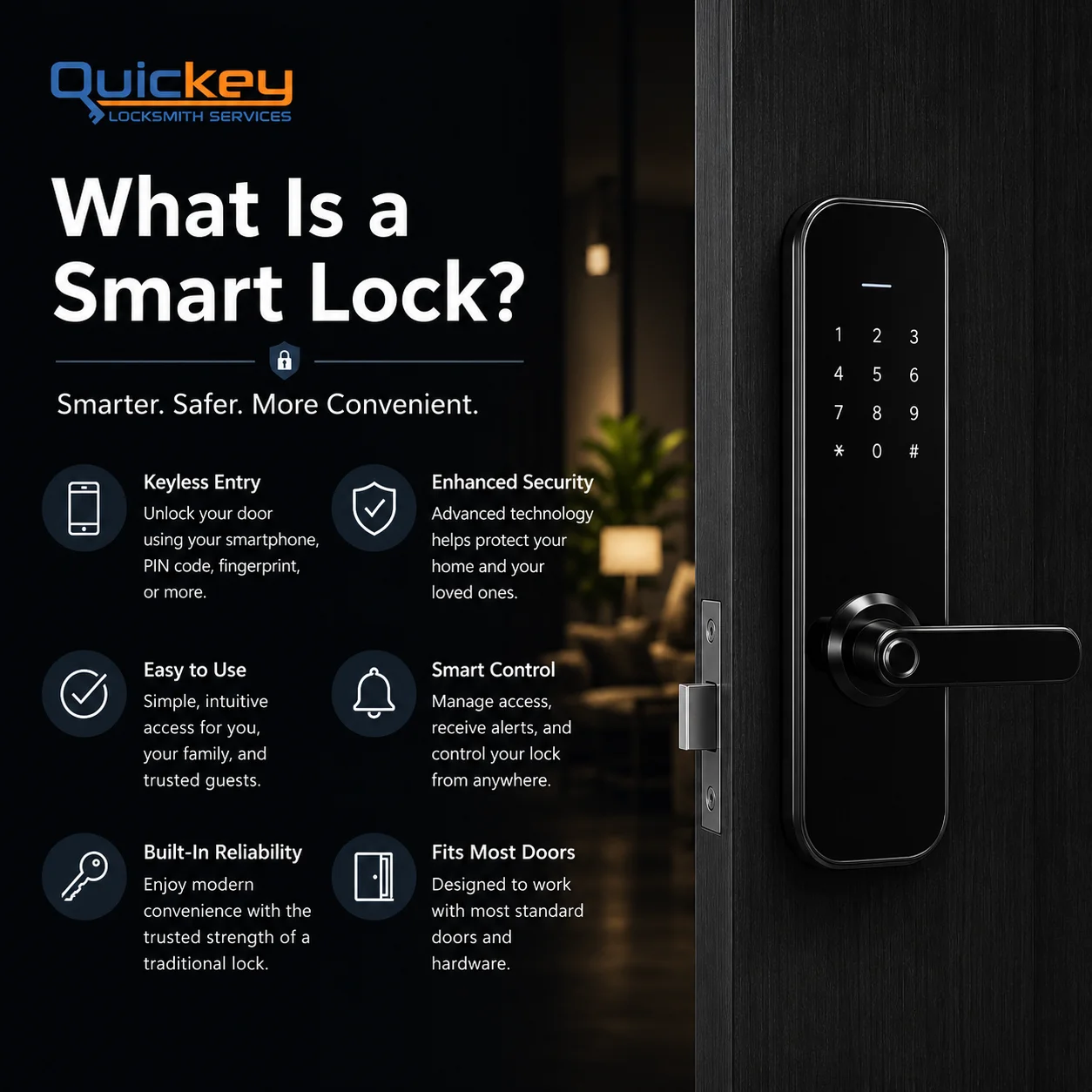
An infographic titled "What Is a Smart Lock?" with the Quickey Locksmith Services logo displayed in the top-left corner. The design uses a dark blue and black theme with white text and blue accent lines. The left side contains the main heading, followed by the tagline "Smarter. Safer. More Convenient." Below it are six illustrated feature blocks arranged in two columns with circular icons. The first explains Keyless Entry, showing that a smart lock can be unlocked using a smartphone, PIN code, fingerprint, or other supported methods. The second highlights Enhanced Security, explaining that advanced technology helps protect the home and family. The third feature, Easy to Use, describes simple and intuitive access for homeowners, family members, and trusted guests. The fourth, Smart Control, explains that users can manage access, receive alerts, and control the lock remotely. The fifth feature, Built-In Reliability, emphasizes modern convenience while maintaining the dependable security of a traditional lock. The sixth feature, Fits Most Doors, states that many smart locks are designed to work with standard residential doors and existing hardware. The entire right side of the infographic features a realistic close-up of a modern black smart lock with a touchscreen keypad and lever handle installed on a dark wooden door. In the softly blurred background, a warm, modern home interior is visible with ambient lighting and a green houseplant, reinforcing the idea of smart home security and convenience.

What Is a Smart Lock?

A smart lock is an electronic locking system designed to make entering your home easier and more convenient than using a traditional key alone. Instead of relying only on a physical key, it gives you multiple secure ways to access your home while keeping the same reliable locking mechanism.

Think of a smart lock as a traditional lock with modern technology built into it. The physical lock still secures your door, but the way you access it becomes much smarter. Depending on the model, you can unlock your door using a smartphone, PIN code, fingerprint, key fob, or even voice commands through compatible smart home devices.

Most smart locks are designed to work with existing doors, and many models still allow you to use a physical key as a backup. This means you get the convenience of keyless entry without giving up the reliability of a traditional lock when you need it.

It bridges the gap between modern automation and classic home safety.
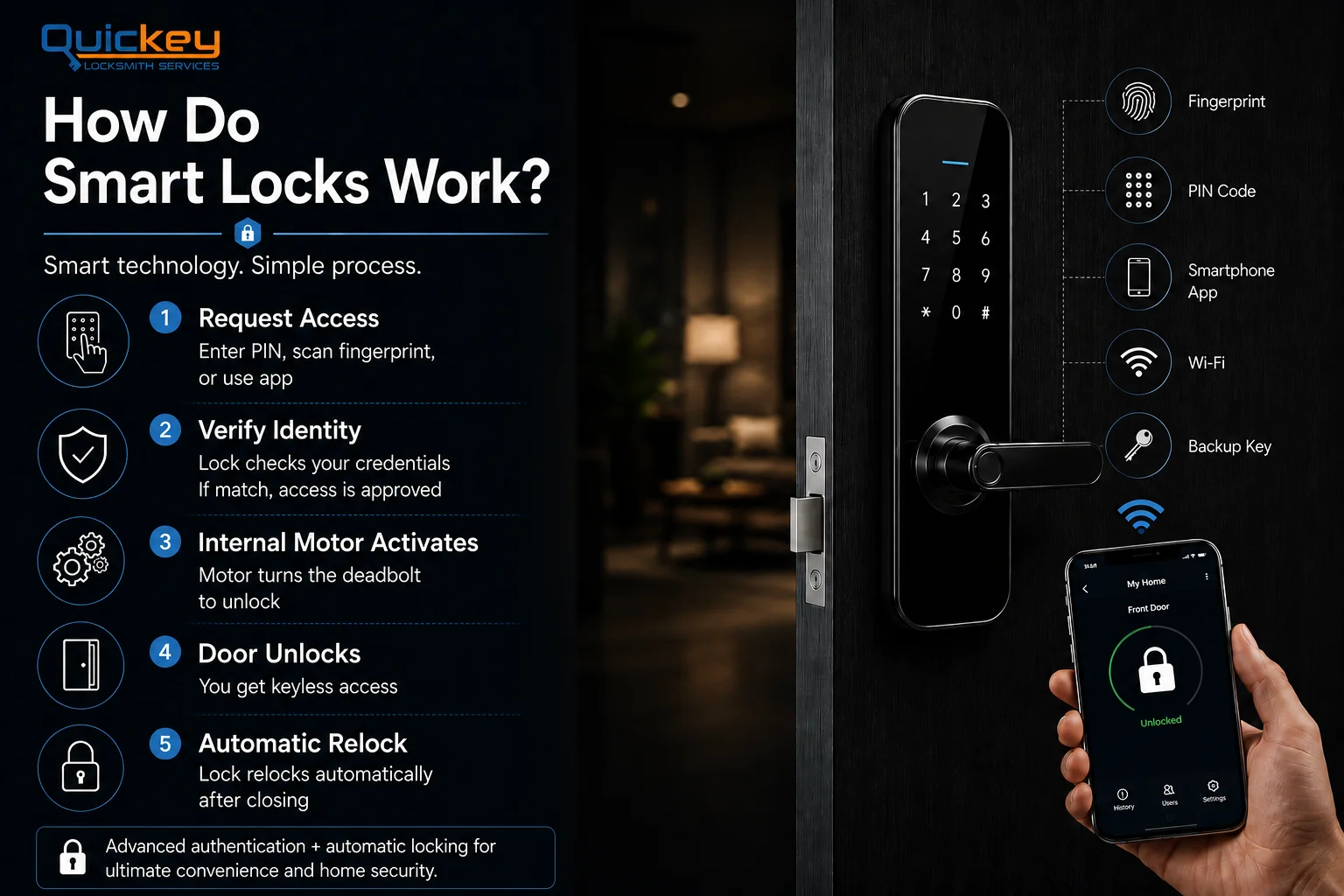
An infographic titled "How Do Smart Locks Work?" by Quickey Locksmith Services. The left side explains the smart lock process in five illustrated steps with matching icons: (1) Request Access by entering a PIN, scanning a fingerprint, or using a mobile app; (2) Verify Identity, where the lock checks the user's credentials before granting access; (3) Internal Motor Activates, turning the deadbolt electronically; (4) Door Unlocks, providing keyless entry without using a physical key; and (5) Automatic Relock, where the door locks itself again after closing. The right side features a realistic black smart lock installed on a modern dark wooden door, alongside icons representing supported access methods including fingerprint recognition, PIN code, smartphone app, Wi-Fi connectivity, and a physical backup key. At the bottom-right, a hand holds a smartphone displaying an unlocked smart lock interface, while a banner along the bottom highlights that advanced authentication and automatic locking provide greater convenience and home security. The overall design uses a dark blue and black color scheme with white text and realistic smart home visuals.

How Do Smart Locks Work?

Smart locks work by verifying your identity before allowing access to your home. Instead of relying only on a physical key, they use secure authentication methods such as a PIN code, fingerprint, smartphone app, Bluetooth, Wi-Fi, key fob, or a traditional backup key, depending on the model. Once your identity is verified, the lock’s internal motor automatically turns the deadbolt or locking mechanism to lock or unlock the door.

Although different brands use different technologies, most smart locks follow the same basic process:

Request Access

The process begins when you try to unlock the door. This could be by entering a PIN code, scanning your fingerprint, opening the mobile app, tapping an NFC card, or using another supported access method.

Identity Verified

The lock checks whether you’re an authorized user. If the PIN, fingerprint, smartphone, or other credentials match the information stored in the lock, it approves your request. If the verification fails, the door remains locked.

Internal Motor Activates

After successful verification, a small electric motor inside the smart lock rotates the deadbolt or locking mechanism. This unlocks the door in seconds without requiring you to insert or turn a physical key.

Auto Relock

Many smart locks can automatically lock the door after it has been closed for a set period of time. Depending on the model, you can usually customize this setting through the lock’s mobile app.

While the access methods and features vary between models, the basic working principle remains the same: verify the user’s identity first, then electronically control the locking mechanism to secure or unlock the door.

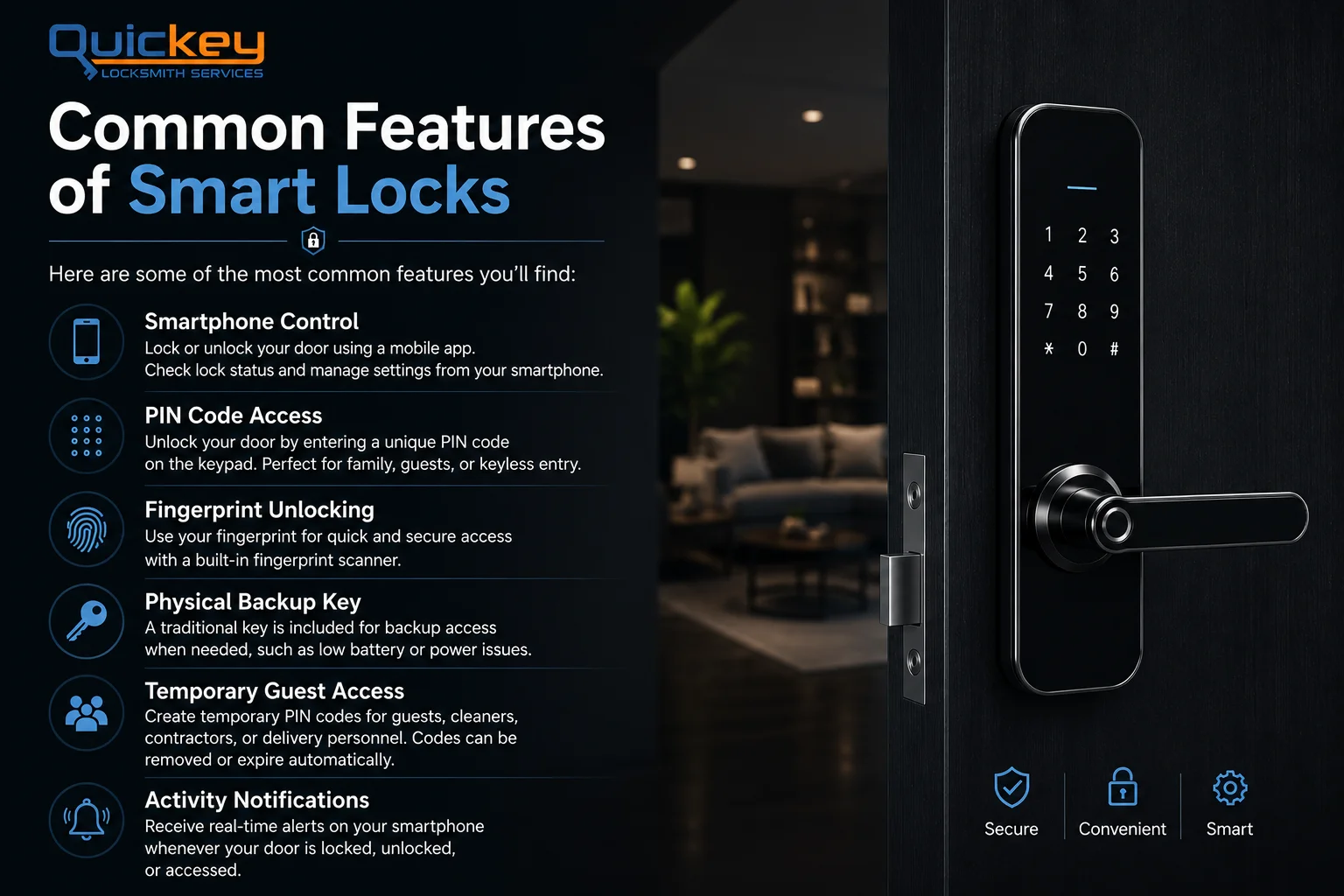
An infographic titled "Common Features of Smart Locks" with the Quickey Locksmith Services logo in the top-left corner. The layout is split into two sections on a dark background. The left side contains the heading "Common Features of Smart Locks," with the words "Smart Locks" highlighted in blue, followed by the subheading "Here are some of the most common features you'll find:". Beneath it are six feature blocks, each paired with a blue circular icon. The first feature, "Smartphone Control," uses a smartphone icon and explains that users can lock or unlock their door, check lock status, and manage settings through a mobile app. The second feature, "PIN Code Access," uses a keypad icon and describes unlocking the door with a unique PIN code, making keyless entry convenient for family members and guests. The third feature, "Fingerprint Unlocking," displays a fingerprint icon and explains that users can unlock the door quickly and securely using a built-in fingerprint scanner. The fourth feature, "Physical Backup Key," uses a key icon and notes that a traditional key is included for backup access during low battery or power-related situations. The fifth feature, "Temporary Guest Access," uses a group icon and explains that temporary PIN codes can be created for guests, cleaners, contractors, or delivery personnel and later removed or set to expire automatically. The sixth feature, "Activity Notifications," uses a notification bell icon and explains that users receive real-time alerts whenever the smart lock is locked, unlocked, or accessed. Thin blue divider lines separate each feature for readability. The right side of the infographic features a realistic black smart lock with a touchscreen keypad installed on a modern dark wooden door. In the softly blurred background is a contemporary living room with warm ambient lighting, a sofa, coffee table, indoor plant, and ceiling lights, creating a premium residential atmosphere. At the bottom-right corner, three blue outline icons labeled "Secure," "Convenient," and "Smart" summarize the main benefits of smart locks, reinforcing the overall message of convenience, security, and modern home access.

Common Features of Smart Locks

While features vary from one model to another, most smart locks include several functions designed to make home access more convenient, secure, and easier to manage. Here are some of the most common features you’ll find:

📱 Smartphone Control

Many smart locks let you lock or unlock your door using a mobile app. Depending on the model, you can also check the lock’s status and manage settings directly from your smartphone.

🔢 PIN Code Access

Instead of carrying a physical key, you can unlock the door by entering a unique PIN code on the keypad. This is especially useful for family members, guests, or anyone who prefers keyless entry.

👆 Fingerprint Unlocking

Some smart locks include a built-in fingerprint scanner, allowing authorized users to unlock the door with a simple touch. This provides quick access without remembering codes or carrying keys.

🔑 Physical Backup Key

Most smart locks still include a traditional key as a backup. If the battery runs low or electronic access isn’t available, you can still unlock the door using the physical key.

👥 Temporary Guest Access

Many models allow you to create temporary PIN codes for guests, cleaners, contractors, or delivery personnel. These codes can usually be removed or expire automatically after a set time.

🔔 Activity Notifications

Many models allow you to create temporary PIN codes for guests, cleaners, contractors, or delivery personnel. These codes can usually be removed or expire automatically after a set time.

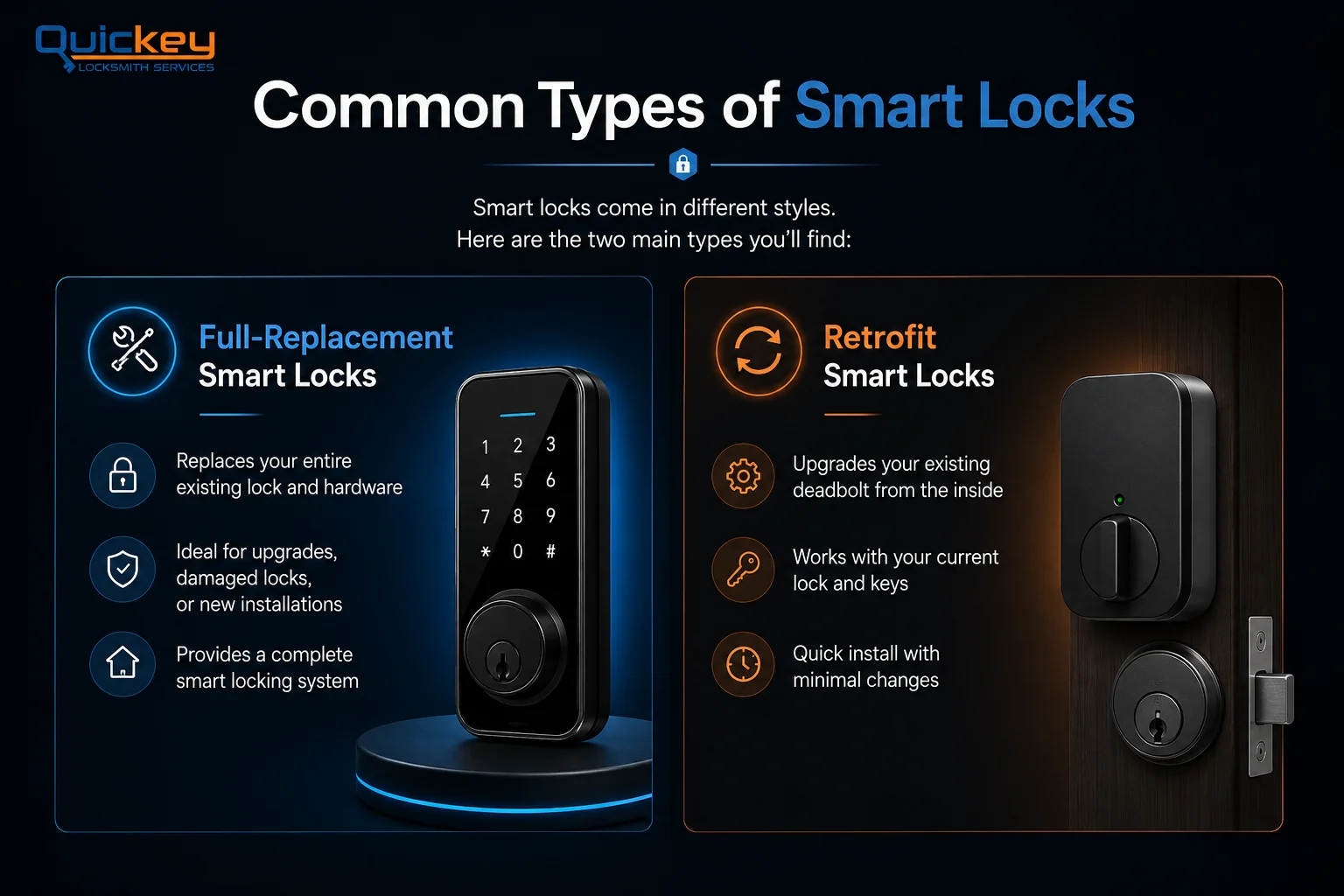
An infographic titled "Common Types of Smart Locks" comparing the two primary smart lock categories. The top section displays the Quickey Locksmith Services logo, the main heading, and a short introduction explaining that smart locks come in different styles with two main types. The infographic is divided into two side-by-side comparison panels. The left panel, highlighted in blue, is labeled "Full-Replacement Smart Locks" and features a modern touchscreen smart lock mounted on a display platform. Three icon-supported points explain that this type completely replaces the existing lock and hardware, is ideal for lock upgrades, damaged locks, or new installations, and provides a complete smart locking system. The right panel, highlighted in orange, is labeled "Retrofit Smart Locks" and features a retrofit smart lock adapter installed on the interior side of an existing deadbolt. Three icon-supported points explain that it upgrades the existing deadbolt from the inside, works with the current lock and physical keys, and offers quick installation with minimal changes to the existing door hardware. The overall design uses a dark blue and black background with blue and orange accent colors to clearly distinguish the two smart lock types, making it easy to compare full-replacement and retrofit smart lock systems at a glance

Common Types of Smart Locks

Not all smart locks are built the same. While they all serve the same purpose, they differ in how they’re installed and how much of your existing lock they replace. They typically fall into one of these two categories:

🛠️ Full-Replacement Smart Locks

A full-replacement smart lock completely replaces your existing lock and hardware. The old deadbolt, exterior components, and interior parts are removed and replaced with a brand-new smart locking system. This option is ideal if you’re upgrading an older lock, replacing damaged hardware, or installing a smart lock as part of a home security upgrade.

🔄 Retrofit Smart Locks

Also known as adapter locks, these systems upgrade your existing deadbolt instead of replacing it. They install on the inside of your door and work by turning the existing thumbturn electronically. From the outside, your lock and physical key remain the same, making installation quicker and allowing you to continue using your current keys.

Is a Smart Lock Worth Considering?

Why Homeowners Choose Smart Locks

Many homeowners choose a smart lock because it makes everyday access easier and more convenient. Instead of relying only on physical keys, you can unlock your door using a PIN code, fingerprint, smartphone, or other supported methods. A smart lock also makes it easier to manage access for family members, trusted guests, or service providers without handing out extra keys.

Things to Consider

Smart locks aren’t completely maintenance-free. Most models run on batteries that need to be replaced from time to time, and some advanced features may require a mobile app or Wi-Fi connection. They also cost more upfront than traditional locks, so it’s important to choose a model that fits both your needs and your budget.

If convenience, flexible access, and better control over your home’s entry are important to you, a smart lock is worth considering. Just be sure to choose a model that fits your door, budget, and security needs.

Need Help Choosing the Right Smart Lock?

Call Quickey Locksmith Services today for expert guidance and professional installation.

Yes. Smart locks can offer better access control than traditional key locks with features like PIN codes, fingerprint access, and automatic locking. However, proper installation and choosing a quality smart lock are important for the best security.


Yes. Most smart locks include a physical backup key, allowing you to unlock your door even if the battery is low or electronic access isn’t available. However, this may vary depending on the smart lock model.

Not always. Most smart locks are designed to fit standard doors, but compatibility depends on your door’s size, thickness, and existing lock. Always check the manufacturer’s requirements before purchasing.

Yes. Many smart locks can work without Wi-Fi by using Bluetooth, a PIN code, fingerprint, or a physical key. However, remote access and some advanced features usually require a Wi-Fi connection.

Related Services