24/7 Locksmith Service
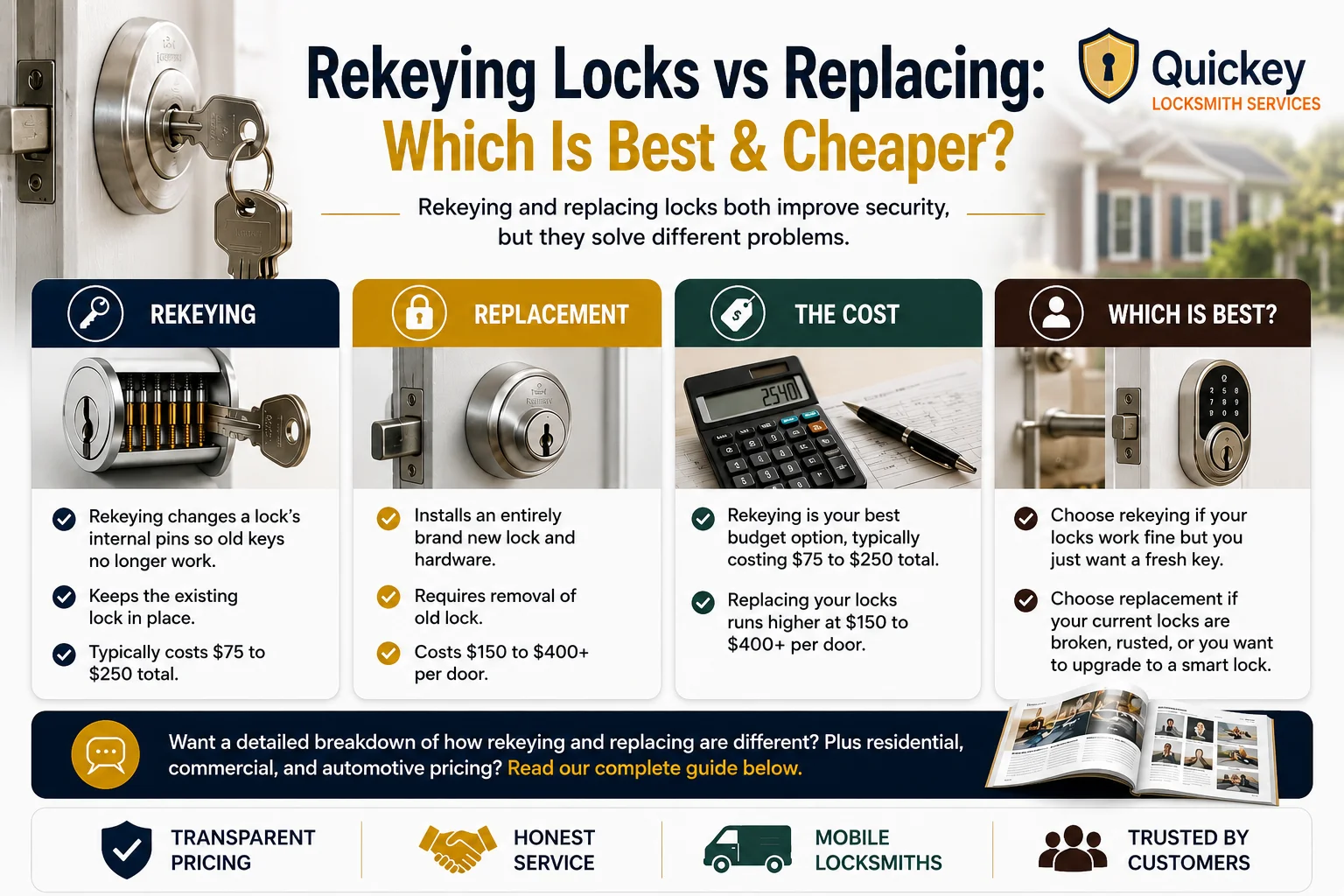
An infographic titled "Rekeying Locks vs Replacing: Which Is Best & Cheaper?" comparing lock rekeying and lock replacement for homeowners. The top section features a residential door lock with keys inserted and explains that both rekeying and replacing improve security but solve different problems. Four comparison panels are displayed beneath the heading. The first panel explains rekeying, showing a lock cylinder with internal pins and stating that rekeying changes a lock’s internal pins so old keys no longer work, keeps the existing lock in place, and typically costs $75–$250 total. The second panel explains lock replacement, showing a new door lock and noting that replacement installs entirely new lock hardware, requires removal of the old lock, and generally costs $150–$400+ per door. The third panel focuses on cost, showing a calculator and highlighting that rekeying is usually the more budget-friendly option while replacement costs more because new hardware is installed. The fourth panel answers which option is best, showing a modern smart lock and explaining that rekeying is ideal when existing locks work properly and only a fresh key is needed, while replacement is recommended for damaged, rusted, outdated, or smart lock upgrades. A banner near the bottom encourages readers to continue for a detailed breakdown of differences and residential, commercial, and automotive pricing. The footer includes icons representing transparent pricing, honest service, mobile locksmiths, and trusted customer service.

Rekeying Locks vs. Replacing: Which Suits You Best?

Rekeying and replacing locks both improve security, but they solve different problems.


  • Rekeying: Rekeying changes a lock’s internal pins so old keys no longer work while keeping the existing lock in place.
  • Replacement: Replacing installs an entirely brand new lock and hardware.
  • The Cost: Rekeying is your best budget option, typically costing $75 to $250 total, whereas replacing your locks runs higher at $150 to $400+ per door.
  • Which is Best? Choose rekeying if your locks work fine but you just want a fresh key. Choose replacement if your current locks are broken, rusted, or you want to upgrade to a smart lock.


Want a detailed breakdown of how rekeying and replacing are different? Plus residential, commercial, and automotive pricing? Keep reading this complete guide below.


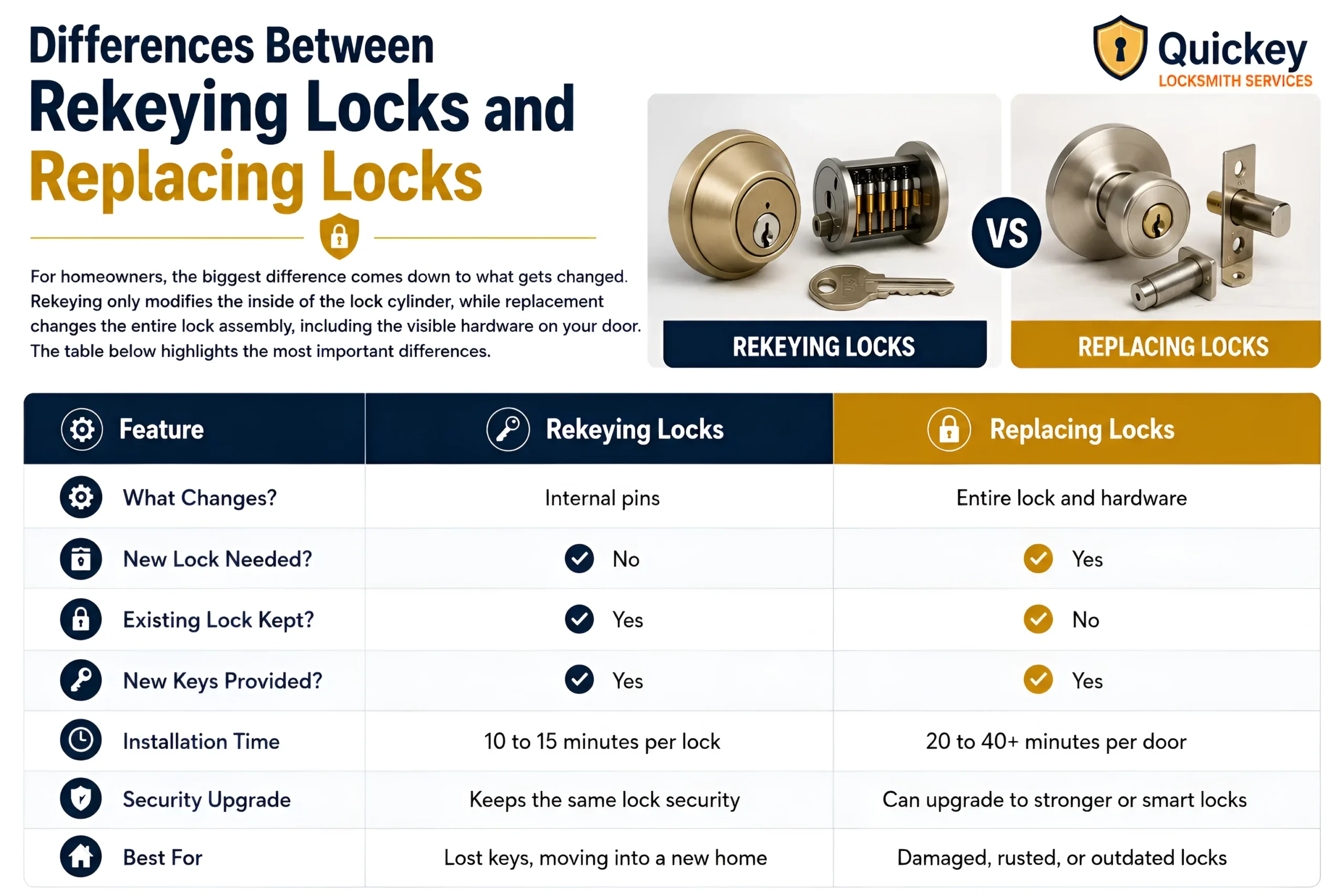
An infographic titled "Differences Between Rekeying Locks and Replacing Locks" comparing the key differences between lock rekeying and lock replacement. The top-left section explains that rekeying only changes the internal pins inside a lock cylinder, while lock replacement changes the entire lock assembly, including the visible door hardware. The top-right section displays a visual comparison between a rekeyed lock cylinder with exposed internal pins and a completely new door lock set, separated by a large "VS" symbol. The lower section contains a comparison table with three columns: Feature, Rekeying Locks, and Replacing Locks. The table explains that rekeying changes only the internal pins while replacement changes the entire lock and hardware. It shows that rekeying does not require a new lock and keeps the existing lock in place, whereas replacement requires new hardware and removes the old lock. Both options provide new keys. The installation time row states that rekeying typically takes 10 to 15 minutes per lock, while replacement takes approximately 20 to 40 or more minutes per door. The security row notes that rekeying maintains the current lock security level, while replacement allows upgrades to stronger or smart locks. The final row highlights common use cases, recommending rekeying for lost keys or moving into a new home and replacement for damaged, rusted, or outdated locks. The infographic uses blue and gold branding colors and includes the Quickey Locksmith Services logo in the top-right corner.

Differences Between Rekeying Locks and Replacing Locks

Although both options improve security, they work in completely different ways. Rekeying keeps your existing lock in place and changes the internal pins so old keys can no longer open it. Replacing a lock removes the entire lock and installs brand-new hardware.

For homeowners, the biggest difference comes down to what gets changed. Rekeying only modifies the inside of the lock cylinder, while replacement changes the entire lock assembly, including the visible hardware on your door. The table below highlights the most important differences.

Feature

Rekeying Locks

Replacing Locks

What Changes?

Internal pins

Entire lock and hardware

New Lock Needed?

No

 Yes

Existing Lock Kept?

 Yes

No

New Keys Provided?

 Yes

 Yes

Installation Time

10 to 15 minutes per lock

20 to 40+ minutes per door

Security Upgrade

Keeps the same lock security

 Can upgrade to stronger or smart locks

Best For

Lost keys, moving into a new home

Damaged, rusted, or outdated locks

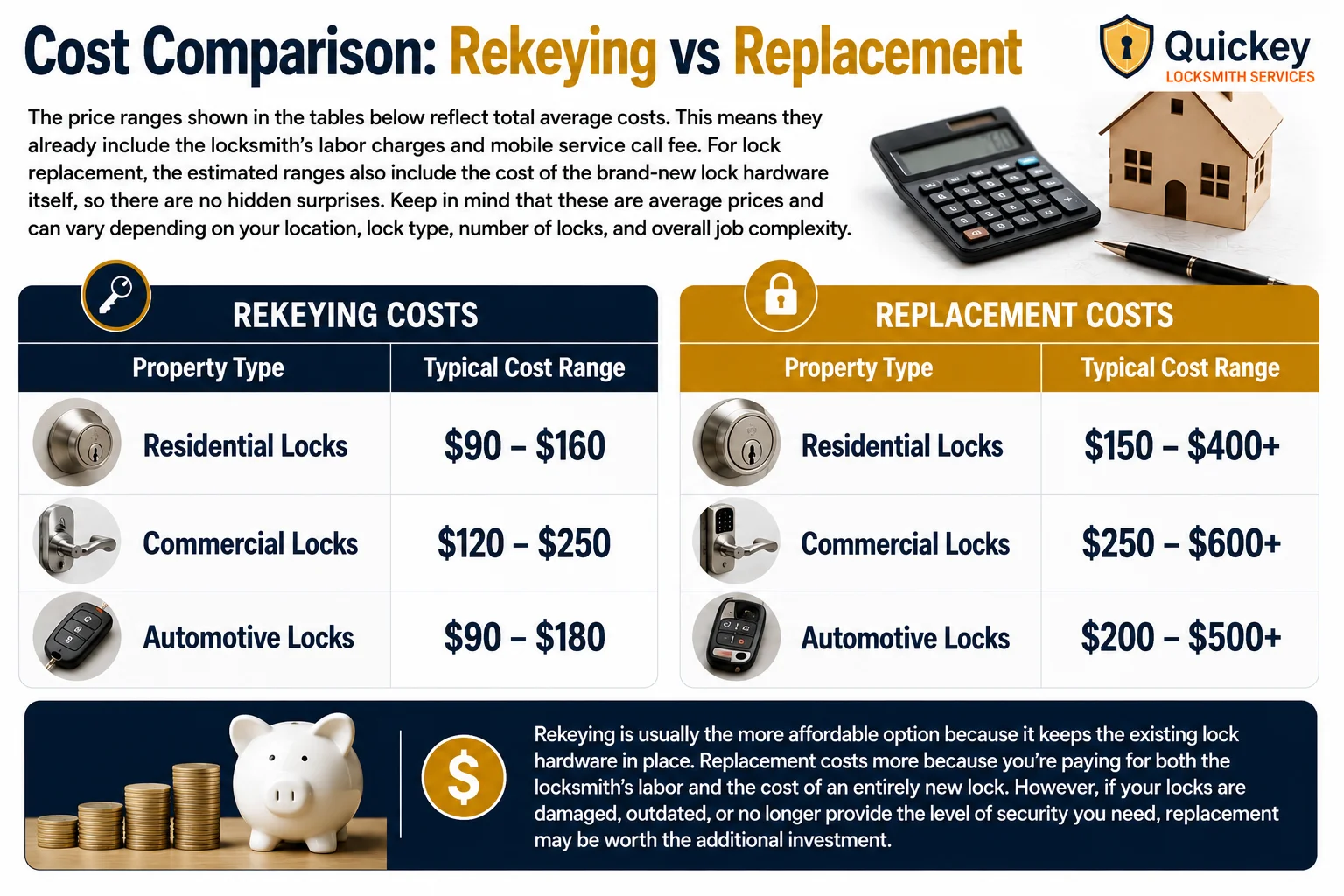
An infographic titled "Cost Comparison: Rekeying vs Replacement" comparing the average costs of lock rekeying and lock replacement across residential, commercial, and automotive properties. The top section explains that all price ranges represent total average costs and already include the locksmith’s labor charges and mobile service call fee. It also notes that lock replacement costs include the price of brand-new lock hardware and that final prices may vary based on location, lock type, number of locks, and job complexity. A calculator, model house, and pen are displayed to emphasize cost planning. The center section contains two side-by-side pricing tables. The left table, labeled "Rekeying Costs," lists typical price ranges of $90–$160 for residential locks, $120–$250 for commercial locks, and $90–$180 for automotive locks. The right table, labeled "Replacement Costs," lists typical price ranges of $150–$400+ for residential locks, $250–$600+ for commercial locks, and $200–$500+ for automotive locks. Lock and vehicle key images are used to represent each property type. A dark blue banner at the bottom highlights that rekeying is generally the more affordable option because it keeps the existing lock hardware, while replacement costs more due to the installation of entirely new hardware. The banner also explains that replacement may be worthwhile for damaged, outdated, or less secure locks. Decorative images of stacked coins, a piggy bank, and a dollar symbol reinforce the cost comparison theme, while the Quickey Locksmith Services logo appears in the top-right corner.

Cost Comparison: Rekeying vs Replacement

The price ranges shown in the tables below reflect total average costs. This means they already include the locksmith’s labor charges and mobile service call fee. For lock replacement, the estimated ranges also include the cost of the brand-new lock hardware itself, so there are no hidden surprises. Keep in mind that these are average prices and can vary depending on your location, lock type, number of locks, and overall job complexity.

Rekeying Costs

Property Type

Typical Cost Range

Residential Locks

$90 – $160

Commercial Locks

$120 – $250

Automotive Locks

$90 – $180

Replacement Costs

Property Type

Typical Cost Range

Residential Locks

$150 – $400+

Commercial Locks

$250 – $600+

Automotive Locks

$200 – $500+

Rekeying is usually the more affordable option because it keeps the existing lock hardware in place. Replacement costs more because you’re paying for both the locksmith’s labor and the cost of an entirely new lock. However, if your locks are damaged, outdated, or no longer provide the level of security you need, replacement may be worth the additional investment.

Living in Houston or nearby areas? Talk to a licensed locksmith to get an exact price and the best option for your home.

When to Choose Lock Rekeying

You just moved into a new home

You lost your keys

A tenant, roommate, or employee moved out

You want one single key for multiple doors

Your locks are in good condition

When to Choose Lock Replacement

 The lock is damaged or broken

The lock is rusted, old, or worn out

You want to upgrade to stronger security

You want to install electronic smart locks

The lock brand/type cannot be rekeyed

Frequently Asked Questions

For most homeowners, rekeying is the better and more affordable option after buying a house because it prevents previous keys from working while keeping the existing locks. However, replacement may be the better choice if the locks are damaged, outdated, or you want to upgrade your home’s security.

 
  • Lock Rekeying: Takes 10 to 15 minutes per lock cylinder.
  • Lock Replacement: Takes 20 to 40+ minutes per door lock.

Yes, rekeying can be just as secure as lock replacement if the existing lock is in good condition. Rekeying changes the internal pins so old keys no longer work, making it an effective way to restore security without replacing the entire lock.

Lock replacement is usually the better option because most smart locks require new hardware. Rekeying only changes the existing lock and does not add smart features.